What's new in FreeRadio: songs, new address and more
Equipe FreeRadio
FreeRadio Editor
Since the post about the new look, FreeRadio has gained a lot. The biggest news: you can now see the name of the song that is playing and keep a list of what you heard. We also moved to a new address, the app speaks Portuguese and English, and the genre and country pages are richer. Here is a summary of everything, with a changelog at the end.
See the name of the song that is playing
Many stations tell us which song is on air. When yours does, FreeRadio shows the title and the artist in the mini player, in the full-screen player and also on the lock screen and in car controls, on devices that show them. When we find the song's cover, it replaces the station's logo.
Not every station reports its songs, and between songs there can be announcers and ads. At those moments the player stays as it always was. For now, stations that stream in the HLS format are left out.
A list of the songs you heard
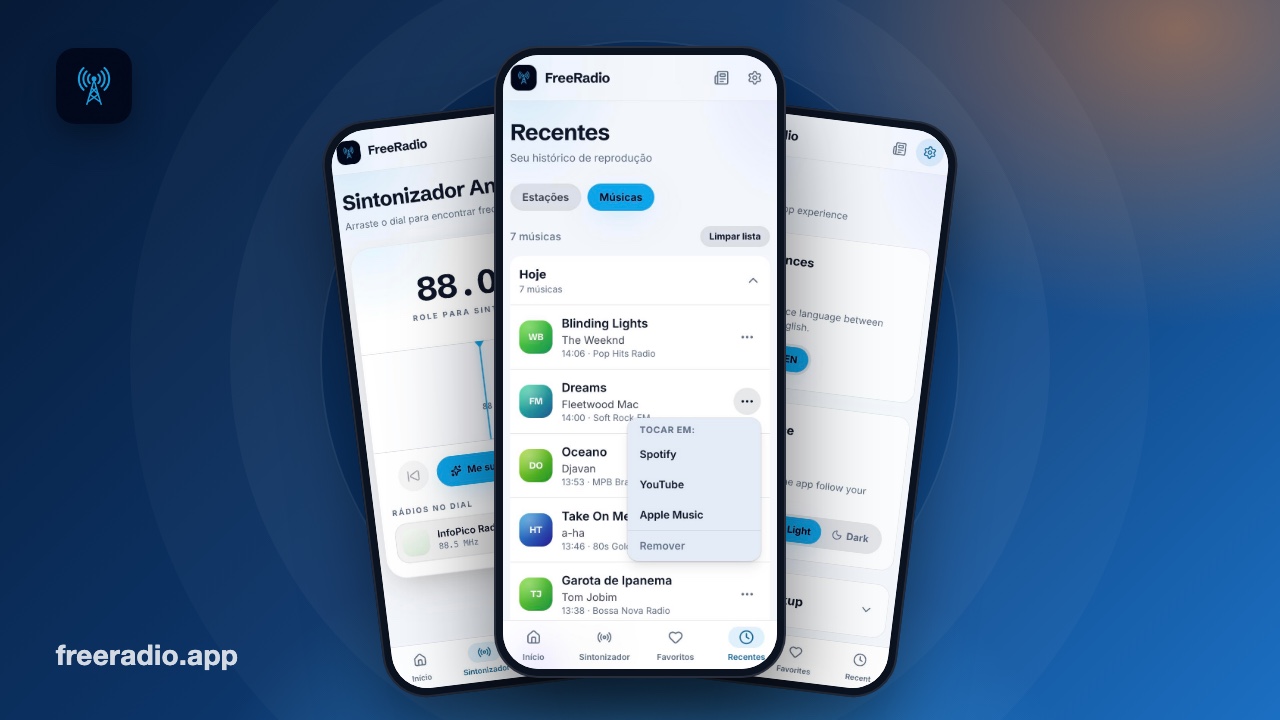
Liked a song and did not write the name down? Open Recent and tap Songs. The list fills itself: a song is added after it has played for a few seconds, so flicking from one station to another does not clutter it. It is organized by day, with today open and the other days folded, each showing how many songs it has.
On each song, the three-dot menu takes you to search for it on Spotify, YouTube or Apple Music, and lets you remove it from the list. You can clear everything whenever you like. The list keeps the most recent songs and stays only in your browser: FreeRadio has no accounts and no sign-up.
It works with the screen off
In the car, or with the phone in your pocket, the app keeps updating the song name while the station plays, even with the screen off. That way the lock screen and the car display follow what is on air. This depends on the browser and the device, and the battery saver mode of some phones can get in the way.
A new address: freeradio.app
FreeRadio now lives at freeradio.app. Anyone who opens the old address is taken to the new one automatically, but it is worth updating your browser shortcuts and bookmarks. We also added a contact address in Settings.
Portuguese and English, each with its own address
The language is now part of the page address: pages in English start with /en. On the first visit to the home page, FreeRadio picks the language from your browser: people who use Portuguese stay in Portuguese, and any other language opens in English. You can change it whenever you like in Settings, and your choice is remembered.
Genre and country pages with more content
Many genre and country pages now have an introduction, questions and answers and links to similar genres, next to the list of stations. Try, for example, sertanejo, jazz, rock or the stations from Brazil. On the home page, Brazilian genres such as sertanejo, pagode, MPB, funk, gospel, forró and samba are now closer at hand.
Surprise me and the tuner
Not sure what to listen to? On the home page, tap Surprise me and FreeRadio tunes a random station for you. The Tuner also gained controls: previous and next, a list of stations under the dial and a short vibration when a station is tuned, on devices that allow it.
Privacy, favorites and small tweaks
- Visits counted without cookies. We count visits with a tool that uses no cookies and stores nothing in your browser. Google Analytics only runs if you allow it, and you can change your mind in Settings.
- Favorites backup. In Settings you can copy your favorites as text and restore them later, to switch devices without losing anything.
- Cleaner station names. We removed symbols and decoration from names, such as a leading # or dashes, so the list is easier to read.
- Cards that fold. Privacy and Backup, in Settings, now stay closed until you open them.
Frequently asked questions
Why do some stations not show the song name?
Because not every station reports the song that is on air. When it does not, or when it is in an announcement or an ad, the player shows the station's name, as before.
Where are the songs I heard stored?
Only in your browser, like your favorites and your station history. They do not go to any account. To delete them, use the button that clears the list.
Does the old address still work?
Anyone who opens the old address is taken to the new one. Update your shortcuts to freeradio.app.
Does FreeRadio use cookies?
Not to count visits. Google Analytics only runs if you allow it. A single cookie stores the language you chose, so the home page opens in the right one.
Changelog
- 1.28: list of songs heard in Recent, song name updated with the screen off, cleaner station names and folding cards in Settings.
- 1.27: title, artist and cover of the song that is playing.
- 1.26: text, questions and answers and their own titles on genre and country pages, with more genres on the home page.
- 1.25: the home page opens in your browser's language.
- 1.24: the main pages are now generated ahead of time, so search engines read them better.
- 1.23: language in the page address, with the English versions under /en.
- 1.22: contact address in Settings.
- 1.21: new address, freeradio.app, with a redirect from the old one.
- 1.20: visit counting without cookies.
- 1.19: Tuner controls: previous, next, station list and vibration.
- 1.18: Surprise me button.
Enjoy!
Published on 2026-10-18